Open My Account from your account menu. Delete account is on the left of the sidebar footer; Update stays on the right.

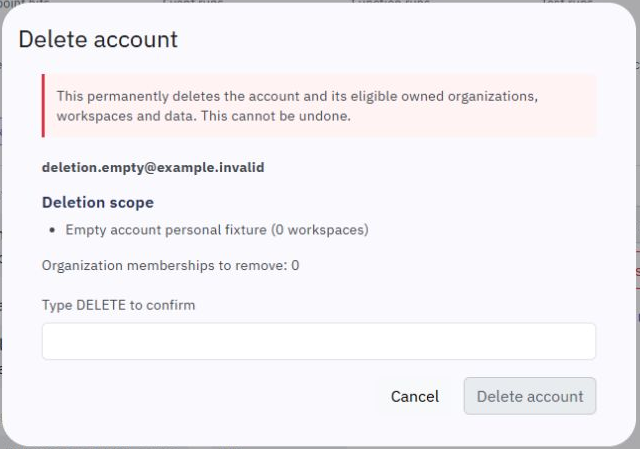
The confirmation dialog lists the account and the organizations and workspaces included in deletion. Read that list before continuing. Cancel closes the dialog without deleting anything.
If you own an organization with other members, transfer its ownership before deleting your account. Deletion does not remove an organization owned by someone else. Organizations owned only by you, including their workspaces and data, are included in the confirmation.
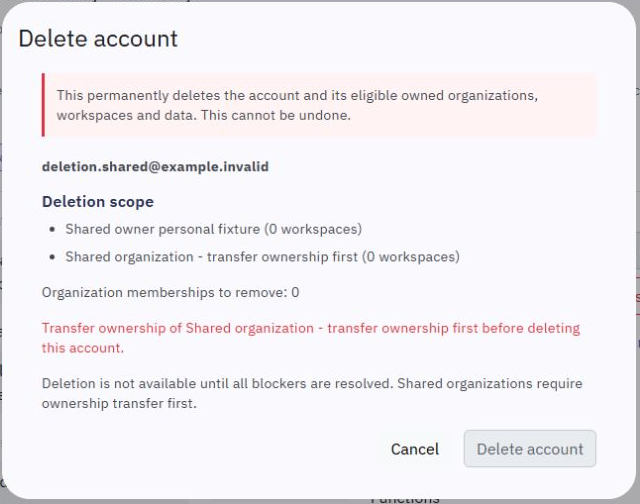
Type DELETE and choose Delete account to confirm. Wait for the result. A deletion that is still running or blocked is not a completed deletion; the dialog shows its actual status and any next step.
After your own account is deleted, you are signed out. Account deletion cannot be undone through the app.
Confirming deletion also cancels subscriptions belonging to the organizations being deleted. The dialog lists the subscriptions it finds. Cancellation is immediate and does not promise a refund. Payment providers may retain invoices and transaction history.
The deletion includes the account's sole-owned workspace data, test copies and stored files. Copies previously downloaded or cached outside Twidget cannot be recalled. Phone-account closure follows the provider's retention rules for past communications.
If Twidget cannot verify that active work has stopped or that a provider's cleanup succeeded, it does not report the account as deleted. Archived or restoring workspaces, preservation holds and custom domains can require review or removal first. Follow the reason shown in the dialog; do not keep submitting new deletion requests.
On Users, open the selected user's details and choose Delete account. Check the account identity and deletion scope in the confirmation dialog. The same ownership-transfer requirement applies.
The existing Request erasure review action records a review request. It is separate from account deletion and does not itself delete an account.
The deletion review checks for running or unresolved work before allowing confirmation. Finish any running tests or jobs and review again. If an earlier operation needs support review, the account remains available while that issue is investigated; the review does not start deletion.
Once deletion has been confirmed, access is disabled while cleanup runs. A pending request remains pending until its cleanup is verified. You can register with the email again after deletion has completed.
Workspace Basics
In Twidget, a workspace serves as a dedicated environment for creating resources that contribute to an API's development. An organization can have multiple workspaces, each capable of creating a single API. Within a workspace, you can create the following resources: - [Endpoints](/docs/api/endpoint-...
Dashboard
Open Dashboard from the sidebar for an overview of the selected workspace. Its activity charts and shortcuts help you find recent traffic, errors and workflows. The monthly allowance panel covers your whole organization, including its other workspaces. 
