You can customise the successful response from an endpoint, including its status code and additional headers.
Open the endpoint and its Output editor.
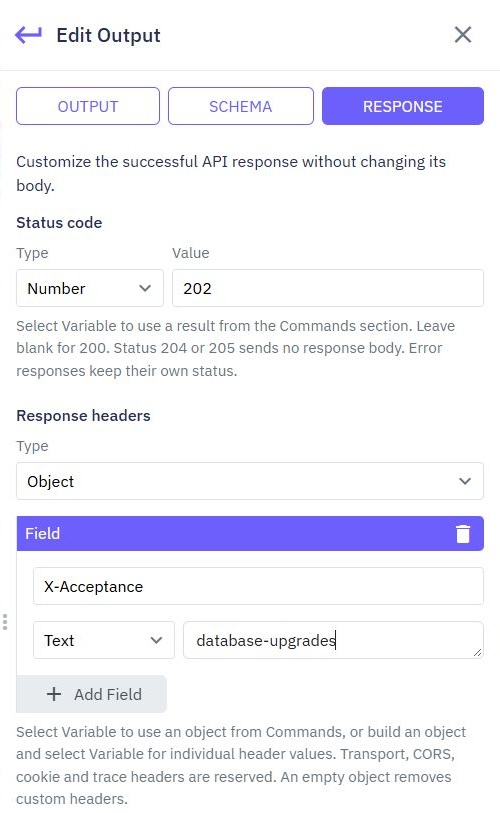
Select RESPONSE.
Choose a status code or select a variable from the commands section.
Add a response-headers object if you need additional information in the response.
Save, test and publish the endpoint.
This example chooses status 202 and adds an X-Acceptance header with the text database-upgrades.
After publishing, the sample call shows HTTP 202 Accepted in the API client.

Leave the status blank to use 200. For a create operation you might use 201. 204 and 205 responses have no response body.
These settings apply to successful responses. Error responses keep their own status. Some headers, including cookie, browser-access and tracing headers, are reserved and cannot be changed here.
Use a variable when a header depends on the workflow, such as an app version or a value you calculated. Use an empty headers object to remove custom headers.
Creating Authentication Endpoints
Follow these steps to create authentication endpoints in Twidget: Step-by-Step Guide. 1. Navigate to API Tab: - Go to the `API` tab in your Twidget dashboard. 2. Create New Endpoints: - Click on the `Create Endpoints` button located at the top right corner. 3. Select Authentication: - In the newly o...
Action Stats
Action Stats gives Twidget administrators a history of endpoint calls and event runs. It is an admin tool, rather than a workspace feature available to every team member. Find a run. Open Action Stats in the admin sidebar. Filter by workspace, organization, action type, test or real call, result, st...
Endpoint Inputs
In Twidget, endpoints have a variety of input types that can be used to configure and execute API requests. These input types include queries, headers, body, files, and path inputs. Each input type serves a specific purpose in allowing users to interact with APIs efficiently. Files. The files input ...
Custom Endpoints
In addition to generating CRUD (Create, Read, Update, Delete), authentication, and file management endpoints, Twidget allows you to create completely custom endpoints from scratch. These custom endpoints give you full control over the various aspects of endpoint configuration, including the inputs, ...
Create File Endpoints
Overview. Twidget allows you to create file endpoints, which enable you to manage files in your file store. This feature is designed to streamline your workflow by providing predefined endpoints for common file operations. Creating File Endpoints. To create a file endpoint in Twidget, follow these s...

