


Indexes and Unique Fields
Add lookup and unique indexes to a Contacts table. See how uniqueness prevents duplicate values and how to inspect the result.
Watch tutorial (4:03)
Add lookup and unique indexes to a Contacts table. See how uniqueness prevents duplicate values and how to inspect the result.
Watch tutorial (4:03)Indexes help Twidget find records quickly. A unique index also prevents duplicate values from being saved.
Use a lookup index for a field you regularly filter or sort, such as an order date. Use a unique index when a value must not appear twice, such as a membership number.
A compound index combines fields. For example, a unique combination of event_id and email prevents someone registering twice for the same event while allowing them to register for a different event.
Open Database and edit the field in your table.
Find Field Index.
Choose whether values must be unique.
For text, choose Ignore letter case if Alice and alice should count as the same value.
Select Create Index.
If existing records contain duplicates, resolve them before enabling uniqueness. Twidget does not delete those records for you.
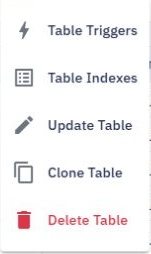
Open the table's options menu and select Table Indexes.
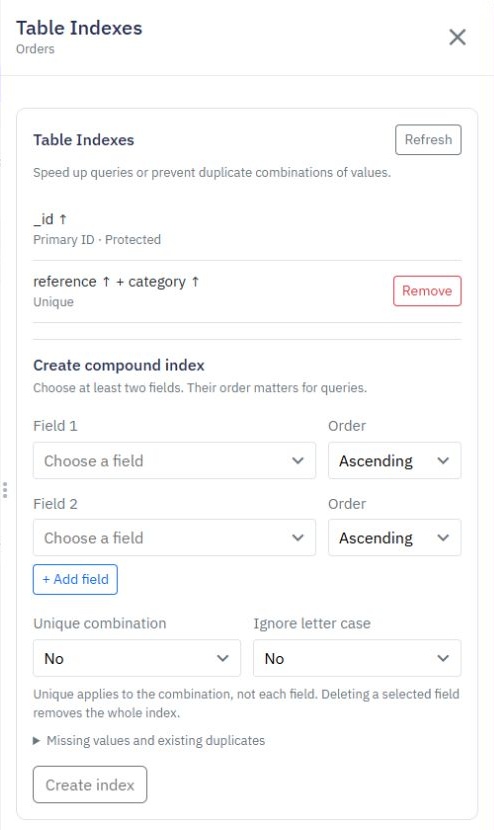
Under Create compound index, choose at least two fields.
Choose ascending or descending order for each field. Put the fields you usually filter together first.
Enable Unique combination if the combined values must be different for every record.
Optionally enable Ignore letter case.
Select Create index.
You can combine up to eight fields. Choose ordinary single-value fields; lists and objects cannot be used in this editor.
Table Indexes opens its own panel. You can open it from the table's menu on the Database list or from the table page. Use Update Table to change ordinary table settings; Table Triggers is a separate option for automatic event runs.
The panel title identifies the selected table. Existing indexes and the compound-index controls appear together.
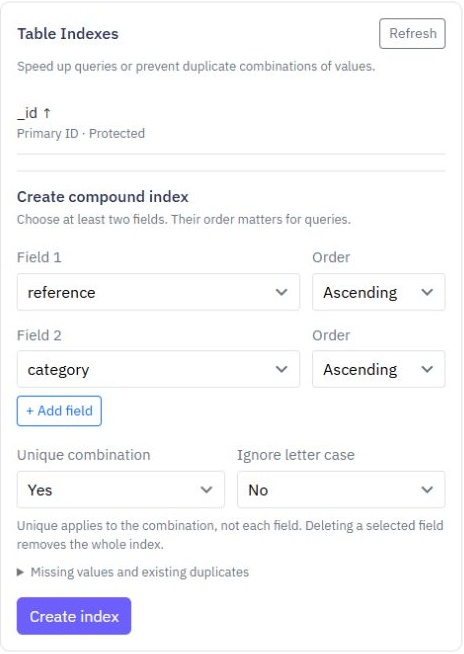
This example combines reference and category, with Unique combination enabled.
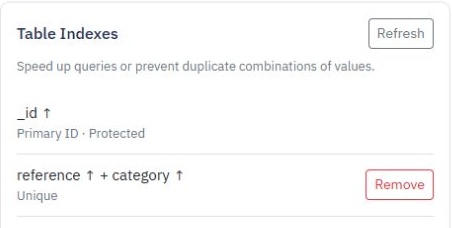
After creation, both fields appear together in Table Indexes, marked Unique. The arrows show each field's order.
Records missing every field in an index are excluded. Records missing only some indexed fields, and records with empty/null values, can still count towards uniqueness. Test your intended rules with sample records before relying on an index.
Deleting a field used in a compound index removes the entire index. Review your table indexes after changing its fields.
Use Remove beside the index, or Remove Index in the field editor. Removing an index keeps your records, but removes that lookup or uniqueness rule. The automatic record ID index is protected.
Create indexes for common queries rather than every field. Each additional index adds work when records are saved or changed.
External Database Connections
Read records from an existing external database without copying all of its data into Twidget. Add a connection. 1. Select your workspace and open Settings → Database Connections. 2. Select Add database connection. 3. Choose the provider: PostgreSQL, MySQL, SQL Server or Snowflake. 4. Enter a connect...
Related Records
Include related information in the same result instead of adding a separate lookup for each record in a list. Example: orders with customers. Suppose your Orders table stores a `customerId`, and your Customers table contains the corresponding customer record. 1. Add Get Multiple Data and select Orde...
Summarise Records
Use Summarize Records when you need a summary rather than a list of every record. Create a summary. 1. Add Summarize Records to your workflow. 2. Choose the table and add filters if you only want some records. 3. Open Output and add a calculation. 4. Choose Count, Sum, Average, Lowest or Highest. 5....
CSV Import
Twidget enables seamless import of data from a CSV file into your database. Follow the steps below to successfully import a CSV file. Step-by-Step Guide. 1. Initiate the Import: - Click on the Import button within the table toolbar. - Select Import from CSV from the dropdown. 2. Open Import Dialog: ...
Table Field Types
Each table column in Twidget has a data type. The available data types are: - Text - Number - Boolean - Date - Object Field Type Adherence. Data added to the table should adhere to the column's field type. When you manually enter data via the web application, the value editor will use the input type...