


Read and Create CSV Files
Read CSV headers and rows, explain text cell types, create formula-safe CSV text and save a round-trip test.
Watch tutorial (5:32)
Read CSV headers and rows, explain text cell types, create formula-safe CSV text and save a round-trip test.
Watch tutorial (5:32)
Create a ZIP from a private file, inspect its entries, read a named entry and verify its text with a saved workflow test.
Watch tutorial (6:20)
Inspect private file permissions, generate a short-lived download link, save a repeatable test and inspect a real expired-link response.
Watch tutorial (3:27)Prepare CSV downloads, work with small ZIP archives and share a temporary download link from an endpoint, server function or event. Find these commands under File Manager when adding a command. Use the usual variable selector and Return as field.
The existing file commands still handle storage, folders, permissions and ordinary text files. See Managing Files.
For image resize/crop/rotate/convert, PDF merge/page selection/text, or XLSX read/write, see Process images, Process PDF files and Read and create spreadsheets. These return new files or values and do not automatically save or publish them.
Image, PDF and spreadsheet processing has limits on file size, complexity and processing time. Shared capacity is also limited, and each call is bounded to help keep processing responsive for other workspaces. The command fields and usual variable controls stay the same.
Capacity is full: wait briefly before trying again. Repeated immediate attempts do not make capacity available sooner.
Data limit exceeded: use a smaller image, fewer PDF pages or a smaller spreadsheet. Check both the input and output limits in the relevant guide.
Deadline exceeded: simplify the file or split the work into smaller commands, then test again.
Unsupported data or options: check the supported format, file contents and selected options. Renaming a file does not change its format.
Temporarily unavailable: try again later. If the message persists, contact support with the command name and error message; do not send confidential file contents.
A failed command does not undo earlier commands in the workflow. Check any earlier saved records or external actions before running the whole workflow again. These processing commands create a new result; they do not overwrite the original file automatically.
Read CSV and ZIP commands need the file's contents. Use an uploaded file input, a file returned by another command, or Get File with Include bytes enabled for a stored file. A path or ordinary file listing alone does not contain the contents to read.
Choose file. Leave delimiter as a comma for ordinary CSV, or choose a semicolon, tab or pipe. has_header is true by default: the first row supplies the column names.
The result contains:
headers: the column names, or an empty list when has_header is false.
rows: a list of objects when headers are present, or lists of cell values when they are absent.
row_count: the number of data rows, excluding the header.
For a file containing name,quantity followed by Tea,2, the first row object has name set to Tea and quantity set to the text 2. Convert a cell to a number later when needed.
Quoted cells can contain delimiters, quotation marks or multiple lines. Files must use UTF-8 text, have a consistent number of columns and contain unique, nonempty headers. An empty file returns empty headers and rows with a count of zero.
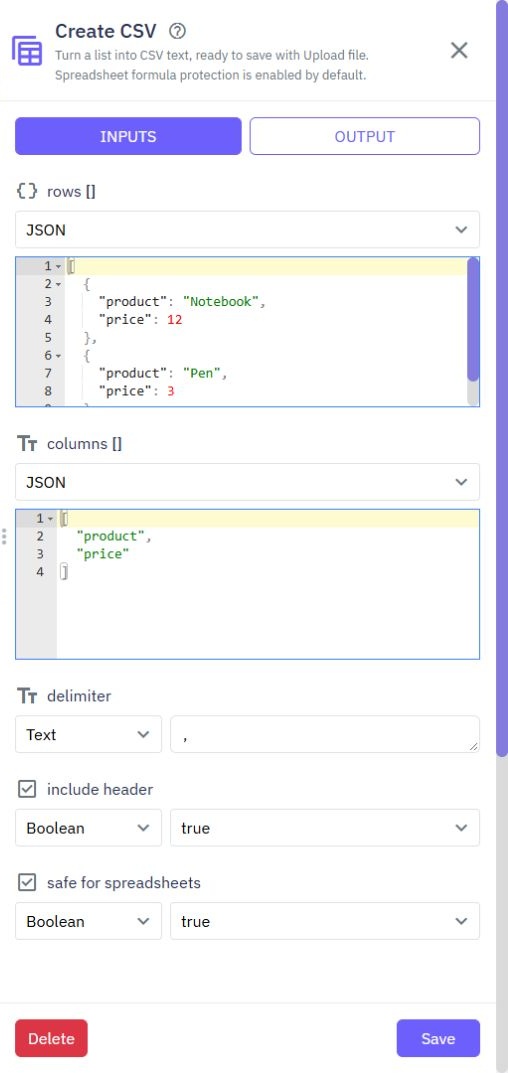
Choose rows, a list of objects such as products or orders. Optionally provide columns, a list of field names in the order you want. Without columns, object rows use the first object's fields. Nested objects and lists are not supported as cells; use a list transformation to select simple values first.
Leave include_header enabled to write the column names and choose the delimiter you need. The command returns CSV text. Pass that text to Upload file, choose a filename ending in .csv and set its content type to text/csv to store it.
safe_for_spreadsheets is enabled by default. Text that looks like a spreadsheet formula is prefixed with an apostrophe so opening the download does not execute that formula. Keep this protection enabled for customer-provided text. Disable it only when the receiving application specifically requires the original text and you have reviewed that data.
Read and Create CSV support up to 10,000 data rows and 100 columns. Read CSV accepts files up to 1 MiB. Generated results are also bounded; large exports should be split into smaller files.
Choose files, a list of objects. Each object has:
name: the filename inside the archive, for example reports/orders.csv.
file: a file value with readable contents.
The result is a file value for archive.zip. Save it using Upload file if you want to keep it, or use it in later file commands. Creating the archive does not save it automatically.
Include between 1 and 100 files, using distinct names. Folder paths inside the ZIP may organize the entries, but cannot point outside the archive. Names that differ only by letter case count as duplicates.
Choose file to inspect an archive without extracting files. The result lists each entry's name, size, compressed_size and is_directory.
Use this to display the available files or find the entry you want before reading it.
Choose the archive file and the exact entry name from List ZIP entries, such as reports/orders.csv. The result is a file value containing that entry's contents. Pass it to Read CSV or Read Text File, or save it with Upload file.
These commands inspect or read entries without extracting an archive into folders. They reject unsafe paths, links, encrypted archives, ZIP64 archives and unsupported archive formats. Both the archive and its total expanded contents are limited to 1 MiB, with up to 100 entries. Very highly compressed archives may also be rejected. Split larger archives into smaller files.
Choose path, the path of an existing file in the current workspace. Set ttl_seconds to the number of seconds the link should remain valid: from 1 to 900 seconds. The default is 300 seconds, or five minutes.
The result is a temporary download address. Return it only after checking that the requesting customer may download that file. Anyone holding the address can use it until it expires, so keep it out of shared logs and messages.
This does not change a file's saved permissions. A file already accessible through a public address remains public; adding a temporary link does not make that public address private. Use private file permissions for files that require controlled access.
Test with a small sample before exporting customer data. Check the file's contents, filename and permissions. If Read CSV reports a column mismatch, inspect quoted cells and the selected delimiter. If a ZIP entry is not found, copy its exact name from List ZIP entries.
These additions run in server workflows. They do not change stored files or existing database records unless a later command explicitly saves something.
Page Security
Use these commands in page workflows to check reCAPTCHA before accepting a form submission. Configure your keys first; see [Page Settings](/docs/pages/page-settings) and the existing [reCAPTCHA guide](/docs/pages/recaptcha). Generate reCAPTCHA token. Generates a token for the current interaction. Th...
Read and create spreadsheets
Use Read spreadsheet and Create spreadsheet under File Manager in a server workflow. They work with XLSX files and simple typed cell values. For CSV text files, use [Advanced file commands](/docs/commands/advanced-files). Read spreadsheet. Choose File, containing its actual contents. Use an uploaded...
Lists
Twidget offers a variety of commands to help you manipulate lists easily without coding. Below is a detailed explanation of each command available. Transform a list. In an endpoint, server function or event, add a command and choose List. Use the commands below to select, reshape, order or combine i...
Math
Twidget offers a variety of commands to manipulate numbers. Below are the math commands available, along with their descriptions, inputs, and outputs. Sum. Description: Adds together a list of numbers and returns the sum. - Inputs: - `numbers`: A list of numbers to be added together. - Output: A sin...
Session Storage
Twidget includes a suite of session storage commands that enable no-code interaction with the browser’s `sessionStorage` API. These tools allow temporary storage of key-value data for the current page session. Purpose. Session storage commands allow developers to manage transient data tied to a sing...