Open Users from the administrator navigation. Search by name, email, user ID, organization ID or workspace ID, then choose Search. Choose Clear to return to all accounts.
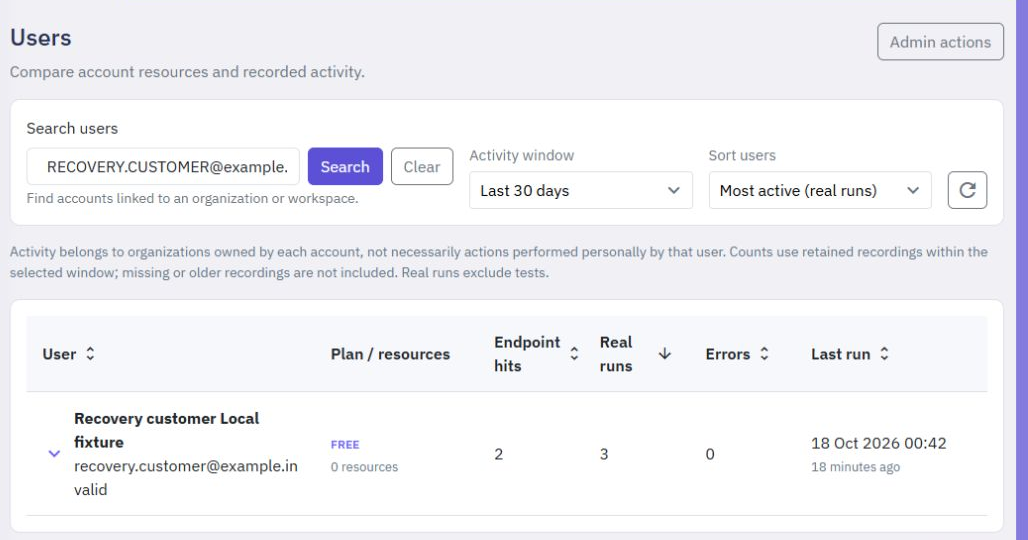
An organization or workspace ID finds accounts linked to that organization, including its owner, members and administrators who added it to their organization list. Deleted organizations and workspaces are not resolved by ID.
Choose an Activity window and Sort users to compare endpoint hits, event runs and other recorded activity. Activity and resource totals belong to organizations owned by each account; finding a member does not attribute the organization's usage to that member. Open a user row to inspect its details.
Platform Analytics shows account totals and recorded activity across the platform. If either page shows a loading error, retry the request; an error is different from a search with no matching accounts.
AI assistance
The former AI generation entry point is now part of Twidget Assistant: one task-based conversation for help, planning and reviewed resource proposals, including native page drafts. Open Assistant in the workspace sidebar or use the small Twidget Assistant helper. In Auto, discuss your goal and answe...
Admin Inbox
The Inbox brings website contact messages and messages sent through the platform's help forms into one place. It is available to Twidget administrators. The existing Emails page still manages templates and bulk email. Find a conversation. Open Inbox in the admin navigation. Filter by source or Open/...
Delete your Twidget account
Open My Account from your account menu. Delete account is on the left of the sidebar footer; Update stays on the right. The confirmation dialog lists the account and the organizations and workspaces included in deletion. Read that list before continuing. Cancel closes the dialog without deleting any...
Dashboard
Open Dashboard from the sidebar for an overview of the selected workspace. Its activity charts and shortcuts help you find recent traffic, errors and workflows. The monthly allowance panel covers your whole organization, including its other workspaces. 
