Paid and lifetime organization owners can buy additional resources when more capacity is needed. Verified active packs increase the allowance used for warning thresholds; buying a pack does not reset recorded usage.
Twidget emails your organization owner when usage reaches 80%, 95% and 100% of an allowance. These are service notifications, separate from marketing emails.
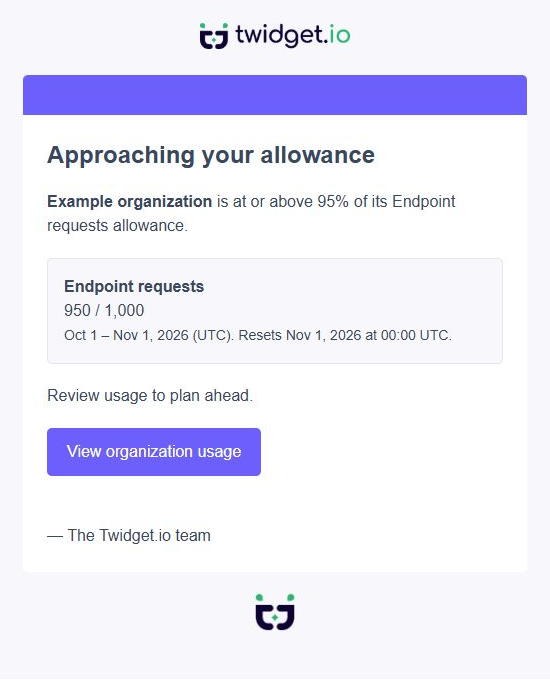
Warnings cover:
Monthly endpoint requests
Monthly event runs
File storage
Database storage
Confirmed requests to nonexistent routes do not count toward endpoint-request warning measurements. Real endpoints returning 404 still count. Older request records are excluded only when Twidget can confirm they were unmatched; uncertain history is kept rather than silently discarded. A failed usage lookup postpones that resource's warning instead of treating the measurement as zero.
The email names the organization and resource, shows the usage and allowance, and links to the dashboard. Select the organization named in the email before reviewing its usage. Monthly warnings also show the allowance reset time in UTC. Storage usage does not reset each month.
Usage is checked periodically. If several thresholds are crossed between checks, Twidget sends the highest applicable warning. For example, a jump from 70% to 98% sends the 95% warning rather than two emails.
Each monthly threshold is sent once for that organization, resource, owner and allowance period. The next monthly period starts a fresh set of warnings. A failed delivery can be retried; an email provider accepting a message does not guarantee inbox delivery.
Storage warnings become eligible again after measured usage drops below 75%. Moving repeatedly between 79% and 81% does not produce repeated emails.
If usage cannot be measured, Twidget waits for a successful measurement rather than treating unknown usage as zero. Some older request and event history is retained for only 30 days. Where that is shorter than the current allowance period, a warning says At least and identifies the count as a lower bound; a warning may arrive later or a threshold may be missed. New-policy endpoint request counters cover their complete allowance period.
Warning emails use your existing plan allowances. They do not introduce new limits or change lifetime access, saved workflows or execution behavior. Currently only the organization owner receives these emails; ordinary members and platform administrators are not added as recipients.
Additional resources
Buy extra capacity for your organization from Billing → Additional resources. Packs are optional monthly subscriptions alongside your existing plan. Business customers can buy packs without changing plans. Prices. Resource packExtra allowanceMonthly price (USD)Endpoint requests100,000 requests$10Eve...
Organization limits
Your organization shares its plan allowances across its workspaces. A test suite allowance applies separately to each workspace. Existing organizations and lifetime plans. Existing organizations keep their current allowances. The new allowance policy applies to newly created organizations; existing ...
Billing
Open Billing to manage payment methods, your subscription, invoices and your organization's AI balance. AI usage and allowances. AI usage shows your available dollar balance, pending usage and completed usage charges. Activity lists token counts and the Twidget usage amount; model names and rate tab...

