API limits help you control how often people can call the endpoints in a workspace. You can set a short-term limit and a monthly allowance.
Select the workspace you want to manage.
Open Settings, then API Limits.
Enable API limits.
Under Allowance per, choose user or token.
Set Requests per minute and Requests per calendar month.
Select Save.
This example allows each authenticated user 10 requests per minute and 100 requests per calendar month. Choose allowances that fit your own app.
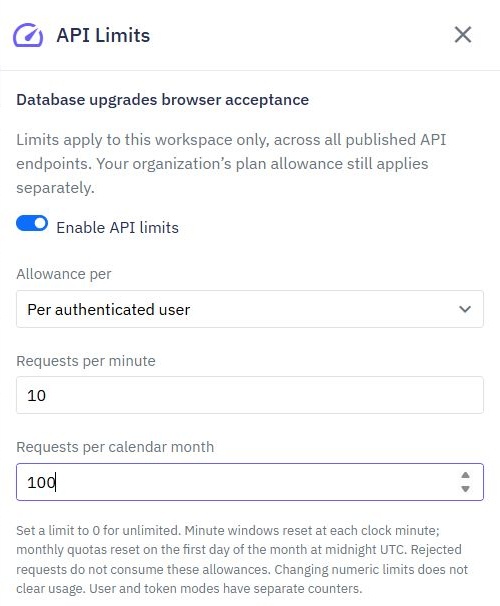
Set a number to 0 to leave that particular limit unlimited. At least one limit must be greater than zero when limits are enabled.
User gives an authenticated person one allowance shared across their sessions.
Token gives each verified authentication token its own allowance.
Calls without a verified user or token share one anonymous allowance. Adding an arbitrary request header does not give a caller a new allowance.
The minute allowance resets at the start of each clock minute. The calendar-month allowance resets on the first day of each month at midnight UTC.
These are the limits you configure for your workspace. Your organization's plan allowance applies separately; do not use these reset dates to calculate a subscription renewal.
Changing the numbers does not clear existing usage. User and token modes have separate usage counters.
An admitted API call counts even if its workflow later fails. A rejected call does not consume these allowances. Scheduled events, internal function tests and browser preflight calls are excluded.
When a caller exceeds a limit, Twidget returns status 429 and a retry time. Your app should explain the limit and wait before trying again. If Twidget cannot check limits temporarily, it may return status 503 instead.
Endpoint Inputs
In Twidget, endpoints have a variety of input types that can be used to configure and execute API requests. These input types include queries, headers, body, files, and path inputs. Each input type serves a specific purpose in allowing users to interact with APIs efficiently. Files. The files input ...
Creating Authentication Endpoints
Follow these steps to create authentication endpoints in Twidget: Step-by-Step Guide. 1. Navigate to API Tab: - Go to the `API` tab in your Twidget dashboard. 2. Create New Endpoints: - Click on the `Create Endpoints` button located at the top right corner. 3. Select Authentication: - In the newly o...
What is an API
An API (Application Programming Interface) is a set of rules and protocols that allows different software applications to communicate and interact with each other. It defines the methods and data formats that applications can use to request and exchange information, services, or functionalities from...
Endpoint Basics
An endpoint refers to a specific URL (Uniform Resource Locator) that a client can access to interact with the API and perform various operations. Endpoints act as gateways that allow clients (such as web or mobile applications) to communicate with the server hosting the API and perform actions like ...
Authentication
Twidget supports Bearer Authentication to ensure secure access to your endpoints. You can specify which endpoints should be secured or open. Once secured, an endpoint can only be accessed using a valid Bearer Token, which is generated via our API. Additionally, we provide functionality to generate a...

