Use XML commands when a service sends or expects XML documents. They work with the same variable controls as other commands.
Add Parse XML, supply the XML text and choose a mode. SIMPLE is convenient when you need fields from a straightforward document. ORDERED preserves the order of elements and mixed text when that order matters.
Choose Return as, then use the returned value in later commands. Check that the XML matches your expected structure before using fields from an external service.
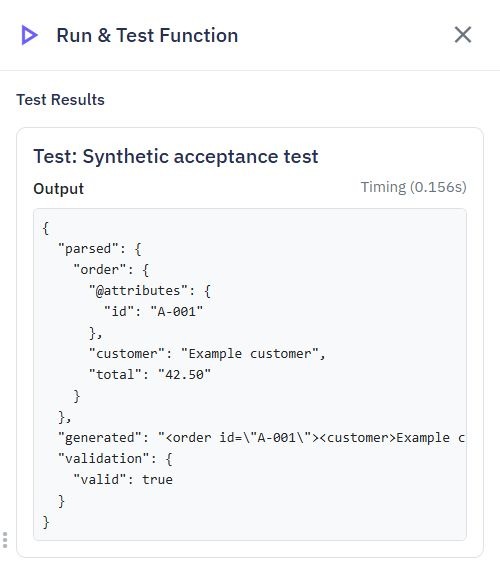
Add Generate XML and supply the value to turn into XML. Use the same mode as the parsed structure you are working with. The command returns XML text, which you can send as a request body with the appropriate XML content type.
Parsing and generating documents is intended for exchanging data. It does not guarantee that the output text is identical to the original document's spacing, comments or formatting.
Add Validate XML to check whether text is a well-formed XML document before processing it. Its result contains valid and, when available, a helpful message. Use a condition to handle invalid input rather than continuing with missing data.
This checks document structure, not whether the document follows a particular industry schema or business rule. Add your own checks for required fields and accepted values.
Documents are bounded in size and complexity. External references and document-type declarations are rejected rather than fetched. If a partner supplies an unsupported document, ask for a plain data document without external dependencies. Do not use these commands to load files or network resources named inside XML.
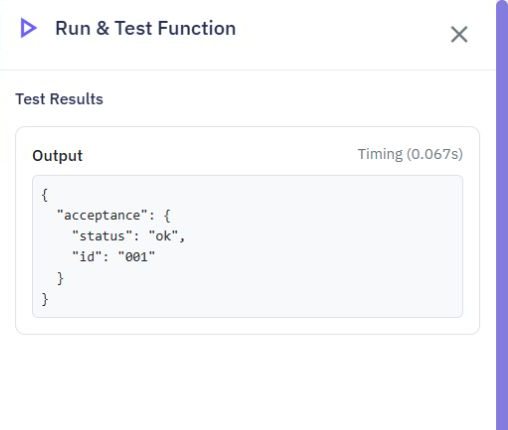
For example, parsing <acceptance><status>ok</status><id>001</id></acceptance> in SIMPLE mode keeps the identifier as the text 001. Choose the parsing command's return variable as the function output to inspect its structure in Test.
Conversion
Overview. Twidget's conversion commands allow you to easily convert different data types to the required format. Below is a list of the available conversion commands and examples of how to use them. The `Convert to Text` command converts the provided value to a text (string) format. Examples: - `123...
Return
The `return` command in Twidget is a special command used to halt the current command workflow and immediately return a specified result. This command overrides any subsequent processes and outputs the return result regardless of the rest of the workflow logic. This command is particularly useful fo...
Read and create spreadsheets
Use Read spreadsheet and Create spreadsheet under File Manager in a server workflow. They work with XLSX files and simple typed cell values. For CSV text files, use [Advanced file commands](/docs/commands/advanced-files). Read spreadsheet. Choose File, containing its actual contents. Use an uploaded...
Cryptography commands
Create checksums, protect text with encryption, sign and verify messages, and compare private text in endpoints, server functions and events. Find these commands under Security when adding a command. They use the familiar variable selector and Return as field. Keep shared signing keys in [Globals & ...
Page Security
Use these commands in page workflows to check reCAPTCHA before accepting a form submission. Configure your keys first; see [Page Settings](/docs/pages/page-settings) and the existing [reCAPTCHA guide](/docs/pages/recaptcha). Generate reCAPTCHA token. Generates a token for the current interaction. Th...

