Include related information in the same result instead of adding a separate lookup for each record in a list.
Suppose your Orders table stores a customerId, and your Customers table contains the corresponding customer record.
Add Get Multiple Data and select Orders.
Set the filters and record limit you need.
Open the command's Output tab.
Under Related records, add a relationship.
Select Customers as the related table.
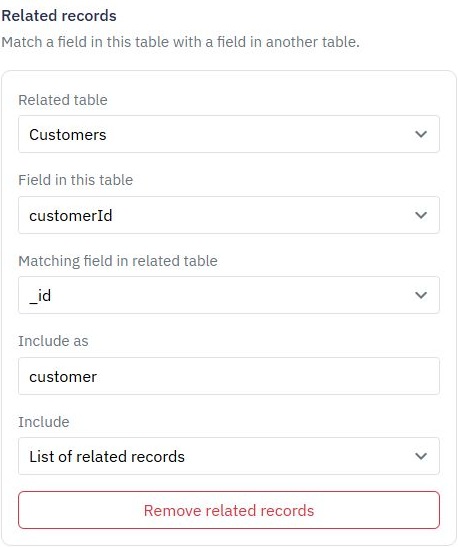
Match customerId in Orders to _id in Customers.
Set Include as to customer.
Choose one related record.
Save and test.
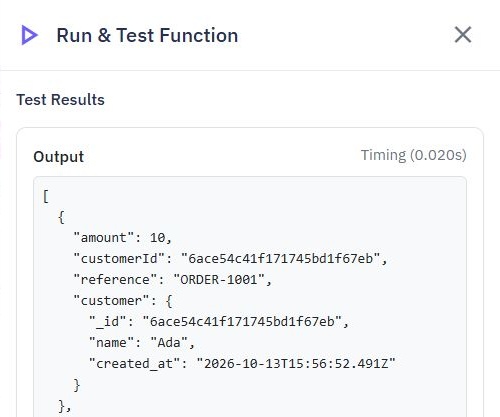
Each returned order now includes its matching customer under customer.
Here is the first order from a sample result. Its related customer, Ada, appears inside customer. This example uses customerId as the matching field in Orders.
Choose one when you expect a single match, such as an order's customer. Choose list when there may be several matches, such as all items belonging to an order.
This settings example uses the same matching fields and shows List of related records. Select the one-record option for the customer example above.
Use an output name that does not overwrite an existing field. Ensure matching fields contain compatible values. Relationships look up matching records; they do not automatically create a relationship or repair inconsistent IDs.
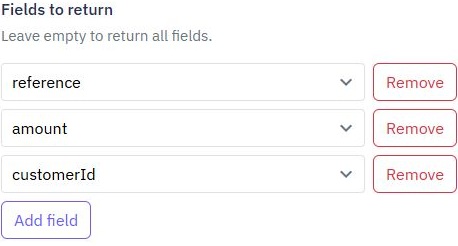
Set an appropriate record limit and choose only the fields your app needs under Fields to return. Large lists with many related records can exceed the allowed result size.
Index frequently used matching fields to keep lookups efficient. See Database Indexes.
Generate CRUD Endpoints
With Twidget, you can efficiently generate CRUD (Create, Read, Update, Delete) endpoints for your database tables upon their creation. This functionality is designed to streamline the development process and ensure that essential API operations are readily available. Enabling CRUD Endpoints. 1. Crea...
Adding Database Table Rows
In Twidget, you can easily add new entries (rows) to your database tables. This feature allows you to expand your data dynamically without the need for complex coding. This document provides a step-by-step guide on how to add rows to your database tables. Adding a New Entry to a Table. To add a new ...
External Database Connections
Read records from an existing external database without copying all of its data into Twidget. Add a connection. 1. Select your workspace and open Settings → Database Connections. 2. Select Add database connection. 3. Choose the provider: PostgreSQL, MySQL, SQL Server or Snowflake. 4. Enter a connect...
Authentication Table
An authentication table is a crucial component in Twidget that is used to store all necessary authentication information, essential for authenticating requests. Overview. - Purpose: To store authentication details such as email, password, token signature, and reset key. - Recommendation: It's recomm...
Database Change Triggers
Run an event automatically when a record is created, updated or deleted in a Twidget table. For example, send a welcome message after adding a customer, or refresh a summary when an order changes. Prepare the event. Create an event containing the steps you want to run. Add an Object input named `tri...

